Monday, September 15, 2014

Want to play with google images??

Hi friends, today I am going to tell you one of the unknown feature which is providing by worlds largest search engine GOOGLE. In some situations when ever your really exhausted with your work and your internet is also not working except google search page and it may give you a big irritation, so you can simply play with google images  by doing below

Open Google Images and enter  "Atari Breakout" in the search bar and wait for two seconds then google will automatically convert into a video game as shown in the below figure.


Note : if you are completed the screen then google automatically gives another round with different images

           
                  After complete the game you can also share your score with your friends


Thanks for reading. share the knowledge that you know


Thursday, September 11, 2014

Don't READ just LISTEN the PDF Document-Simple trick


Hello friends now I am going to tell you one of the simple unknown and in-built feature in Adobe PDF reader. If your PDF document is huge (say 5 MB), you need to read whole document without turn your head and it may lead to severe neck pain and you need full concentration to read the whole document. And while reading if you don't know hoe to pronounce a word you can simply use this feature by just listening

Here is the in-built feature for the users provided by ADOBE READER i.e you can LISTEN the content in the document. By simply using this feature you can minimize your strength. 

Place the cursor from where you want to listen or you can also select the only required text or paragraph by following the below step
  
Go to View menu --> Read Out Loud --> Activate Read out Loud 


Some more details:

  • You can also STOP listening (Shift+Ctrl+E) PAUSE listening( Shift_Ctrl+C)
  • You can also read only current page what your seeing(Shift+Ctrl+V)
  • If you don't know how to pronounce a word you can simply using this feature by selecting the word and enable Read out Load (Shif+Ctrl+ Y)


If my English is not that much as good please forgive me.

Thank you for reading. Share the knowledge that you know


Sunday, September 7, 2014

Awesome unknown trick about windows 7/8 | GODMODE

Hello tech readers, today i will show you one of the unknown and useful feature about windows 7/8. If you want do any changes or set default changes to the system we need to go control panel and search for that change settings. It is a long process and we cant find easily sometimes. In order to simplify this windows have best feature which most of the people who are using windows OS don't about it.


Here is the Trick

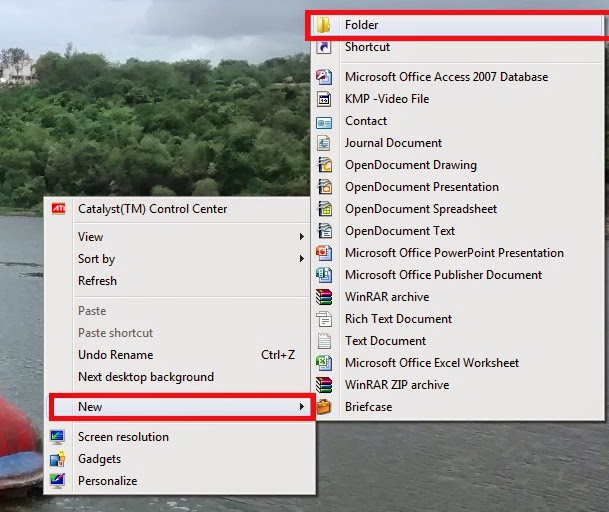
Step 1: Create a new folder any where in your system


Step 2: Rename the Folder with the following text

"TekiTricks.{ED7BA470-8E54-465E-825C-99712043E01C}"


Note: we can use any name in place TekiTricks

Step 3: When you press enter the folder Icon will change like settings Icon.


Step 4
: When you open that file folder you can see whole settings which windows given to you (Action Center, Administrative Tools, Auto Play)


Thanks for Reading. Please share the Knowledge what you know.

Tuesday, August 19, 2014

How to generate Wi-Fi hot spot in windows 7 or 8 without any software Part-3

Common error while generating Hotspot from your system

In previous articles I have explained what are the pre-configurations(How to generate Wi-Fi hot spot in windows 7 or 8 without any software Part-1) and how to start WiFi Hotspot in your system(How to generate Wi-Fi hot spot in windows 7 or 8 without any software Part-2). Now I am going to explain most common error while connecting. In some situations you may get error like "The hosted network couldn't be started.The group or resource is not in the correct state to perform the requested operation." as shown in the below screenshot


 Solution:


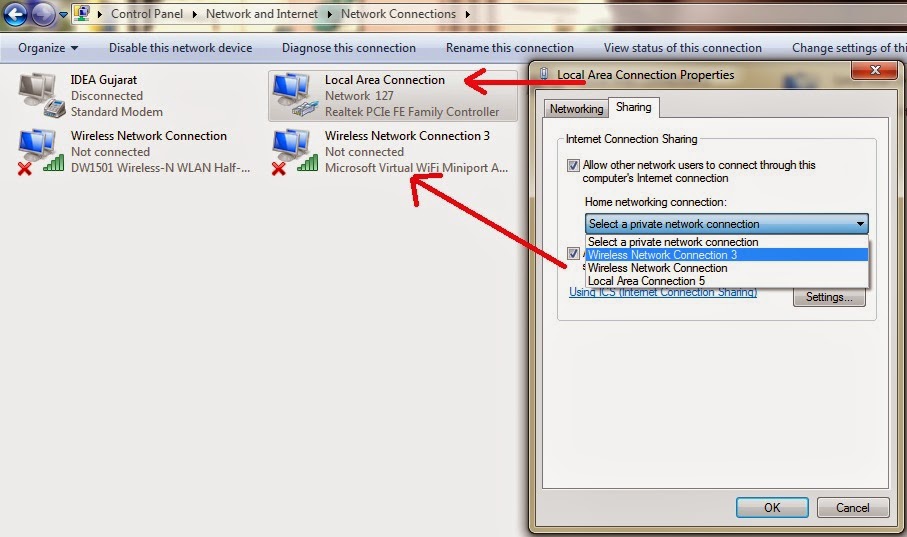
  • Go to Control Panel--> Network and Internet -> Network Connections
  • In Properties of local area connection and go to sharing tab and mark on "Allow other network users to connect through this computer's Internet connection" checkbox (as like in below screen shot). Make sure that your Wireless network connection in enable mode. then press OK. 

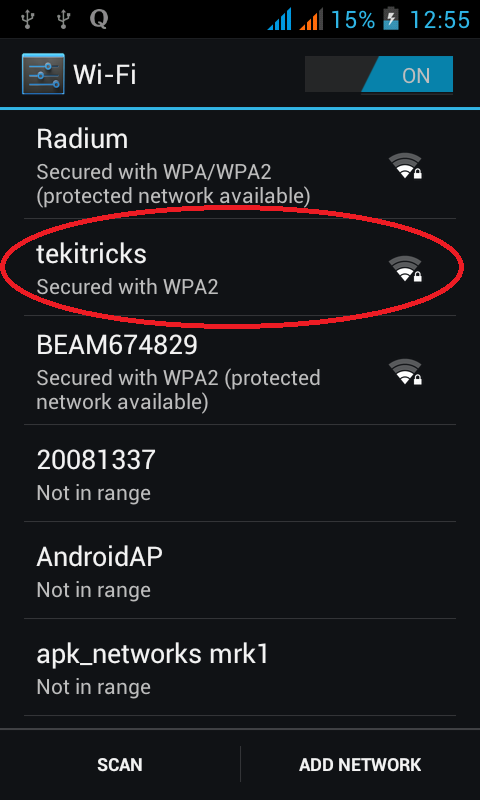
   Now you can happy to use wifi in smartphone devices.


How to generate Wi-Fi hot spot in windows 7 or 8 without any software Part-2


Creating WiFi Hot Spot:

In previous article (How to generate Wi-Fi hot spot in windows 7 or 8 without any software Part-1) I have explain what are the pre-configurations set in you system

  • Open Command Prompt In administrative mode.
  • After checking for adapter in your system please enter below code and press enter

 
Here you can use you own ssid=******* and key=******* like as you wish. Now your system has been set to allow for hosting.


  • Now again enter below code and press enter


If you got the message as same like as in the above figure then system generated WiFi hot spot. you can use
WiFi from your devices like smartphones and iPod etc.


(Common error while generating Hotspot from your system-->How to generate Wi-Fi hot spot in windows 7 or 8  without any software Part-3)

How to generate Wi-Fi hot spot in windows 7 or 8 without any software Part-1


Hello tech innovators. I am going to teach you one of the most important and useful trick. Do you know you can use your PC as Wi-Fi hot spot generator? most of don't know about this. So i want to share this knowledge with you.

Before explaining this trick we need to check our system for comparability i.e., make sure that our system contain In-built or external WiFi adapter which supports to share internet with other devices. To check this please follow the below step


  • Open windows Command prompt in administrative mode(not by double clicking on icon, right click and then Run as administrator) 


  •  Enter the below code and press enter


 As shown in above figure Hosted network  supported should be 'YES' then only your system will be able to generate WiFi hot spot.Now a days most of the laptop come with in-built wifi adapters.

How to generate Wi-Fi hot spot in windows 7 or 8  without any software Part-2